Ledger · Cash + Save + Debts
Budget tracker app with debt payoff and savings goals
Ledger puts your budget, your savings goals and your debt payoff in one web app, not a spreadsheet. No Google account, no copying templates, no broken formulas. Open it on your phone or your computer and your data is the same on both.
$14.99 once on Etsy · lifetime access · phone and desktop

What it does
Everything Ledger does
Cash flow, monthly or weekly
Income in, expenses out, and what is left, viewed by month or by week.
Category insights
Spending by category, with the change from last month.
Savings goals
Targets for each goal and your progress toward them, with pool-based allocation across goals.
Debt payoff
Every debt in one list, with each payment split into interest and principal.
Payoff curves and history
A payoff curve for each debt and the full record of payments you have made.
Recurring income and expenses
Templates for the paychecks and bills that repeat, so you are not retyping them.
Real screens
Ledger on a phone
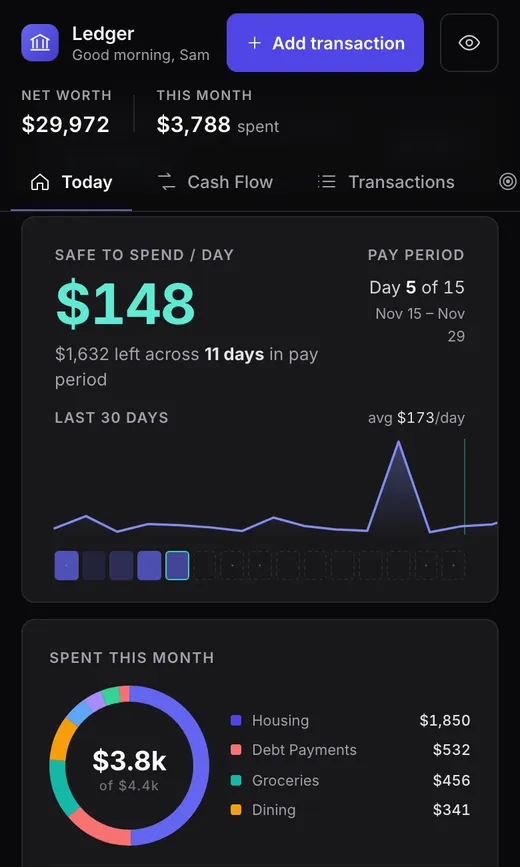
Today 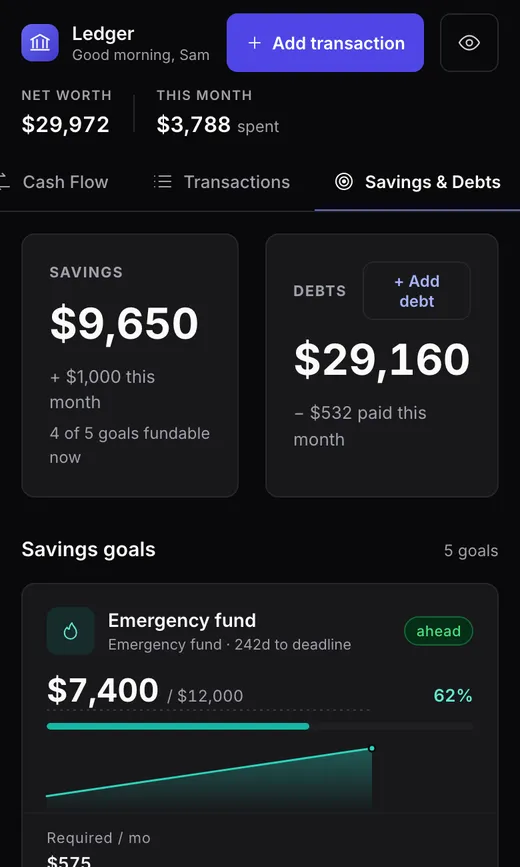
Savings and debts 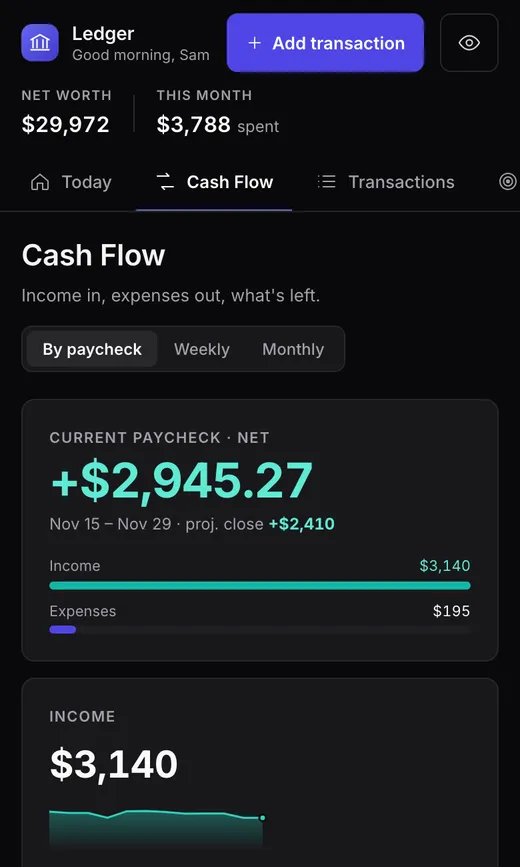
Cash flow
Who it's for
Is Ledger right for you?
Ledger is for anyone running their money across three separate spreadsheets, or a budget template they keep having to repair. You log a payment once, and your cash flow, savings and debt balances all update. You do not need Google Sheets or Excel.
How buying works
Buy once, use it for life
Buy on Etsy
Etsy gives you a PDF download straight away. Nothing is shipped.
Redeem your order
Open the redeem link in the PDF, or go to trackermaster.app/redeem, and enter your Etsy order number.
Start tracking
Create your account and open Ledger. It stays on your account for life and works in any current browser on phone and desktop.
A web app, not a spreadsheet: no Google account, no template to copy, nothing to install. Already own a TrackerMaster tracker? Use the same email and Ledger joins your existing account.
Questions
Ledger FAQ
- Is Ledger a spreadsheet or a template?
- Neither. Ledger is a web app you open in your browser. There is nothing to copy and no formulas to keep working, and you do not need Google Sheets or Excel.
- Does it work on my phone?
- Yes. Open it in any current browser on your phone, tablet or computer. Your data is saved to your account, so it is the same on every device.
- How do I get Ledger after buying?
- Etsy gives you a PDF download straight away. Go to trackermaster.app/redeem, enter your Etsy order number, and create your account. If you already own a TrackerMaster tracker, use the same email and it joins your existing account.
- Is there a subscription?
- No. You pay once on Etsy and Ledger stays on your TrackerMaster account for life. There is no recurring charge.
- Who can see my financial data?
- Only you. Your tracker contents live on your account behind row-level security. We do not sell your data, share it for advertising, or train AI on it.
Ledger, $14.99 once.
Lifetime access on your TrackerMaster account. Questions first? Message the shop on Etsy.