Guide · 4 min read
Meal prep tracking: how to batch-cook for the week and check off every meal
Batch-cooking on Sunday is the easy part. Knowing on Thursday whether the week went to plan is harder. This guide covers how to size a weekly prep, how to track each meal as you eat it, and how to read the result without fooling yourself.
Published by TrackerMaster
Count the meals before you cook
Start from how many times a day you eat on a normal training week, not from a recipe. A common lifter’s day is four meals and two shakes, which is 42 feeds a week. Decide which of those come from the batch cook. Most people prep lunches and dinners, make breakfast fresh, and mix shakes on the spot.
| Feed | Per day | Per week | Source |
|---|---|---|---|
| Breakfast | 1 | 7 | Made fresh |
| Lunch | 1 | 7 | Batch cook |
| Afternoon meal | 1 | 7 | Batch cook |
| Dinner | 1 | 7 | Batch cook, Mon to Thu |
| Shakes | 2 | 14 | Mixed on the spot |
In that example, 18 containers come out of the prep (7 lunches, 7 afternoon meals, 4 dinners). Friday to Sunday dinners are fresh, because cooked food is best eaten within a few days; follow food-safety guidance for how long your batch keeps in the fridge, and freeze the later portions if you prep for the full week.
Plan the cook around three bases
Keep prep simple: one or two proteins, one or two carbs, and a tray of vegetables. Variety comes from sauces and seasoning, not from five separate recipes. Write the plan down with the amount and unit for each item, so next week starts from a known baseline.
- Start the slowest item first, usually rice or potatoes.
- Season the protein in two batches if you want two flavours, then cook both on one tray or in one pan.
- Roast the vegetables while the protein rests.
- Portion into the number of containers you counted, not by eye.
- Label the containers for later in the week, so the oldest ones get eaten first.
Track each meal as you eat it
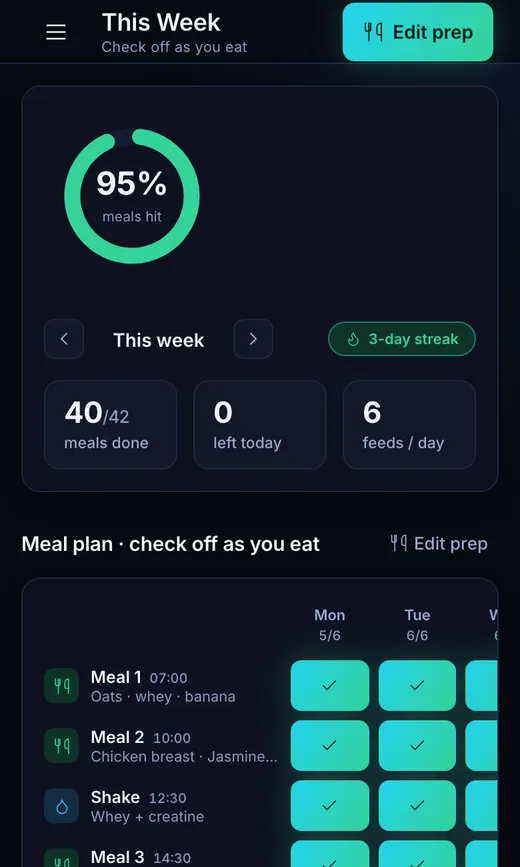
The tracking that works is the smallest possible action: tick the meal off when you eat it. You do not need to weigh or log anything if the food was already portioned on Sunday. What you are measuring is adherence, the share of planned meals you actually ate.
Count only the meals that are due so far. If it is Wednesday evening, Monday to Wednesday is 18 feeds. Ticked 16 of them? That is 89%. Dividing by all 42 feeds of the week would read 38% and tell you nothing useful.
| Feeds due | Checked off | Adherence | |
|---|---|---|---|
| Mon | 6 | 6 | 100% |
| Tue | 6 | 5 | 83% |
| Wed | 6 | 5 | 83% |
| So far | 18 | 16 | 89% |
When the week goes off plan
Skipped meals are information, not failure, as long as they get recorded honestly. If you eat something other than the prepped meal, leave that slot unticked rather than ticking it to keep a streak. The point of tracking is to see the real week, and a record that is always 100% cannot tell you anything.
Leftover containers at the end of the week are the other signal. If three portions of the same meal are still in the fridge on Friday, you prepped more than you eat. Cut that item next week, or move it to a slot you reliably hit. If you run out by Wednesday, you are eating more of the prep than planned, and the amounts should go up.
- Travel or a busy week: prep fewer days and track only those, rather than abandoning the week.
- A missed prep day: a smaller midweek cook of one protein and one carb gets you back on track.
- Bored of the food: change the sauce or seasoning before changing the whole plan.
Read the pattern, not the score
After three or four weeks, the useful signal is which meals you skip. If the afternoon meal is missed most weeks, the fix is practical: pack it the night before, make it smaller, or move a shake into that slot. If shakes get missed, keep the powder at work. One habitually skipped slot is easier to fix than a vague feeling that the week went badly.
- Compare weeks, not days. One bad Tuesday is noise.
- Look at your longest run of full days. It shows what a good week looks like for you.
- Change one thing per week, then see whether that slot improves.
Checklist
Prep-day checklist
- Feeds per day and per week counted
- Meals that come from the prep decided
- Proteins, carbs and vegetables chosen, with amounts written down
- Containers counted to match the plan
- Later-week portions labelled or frozen
- This week’s tracking reset and ready to tick off
- Last week’s most-skipped meal noted and one fix chosen
Print this page to use the checklist on paper.